ASP.NET Core 인증 사용자 프로필 사진 관리
ASP.NET Core Identity를 사용하는 프로젝트에서 사용자 프로필 사진을 관리하려면, 별도의 복잡한 구성 없이 간단한 Razor Page 추가만으로 기능을 확장할 수 있습니다.
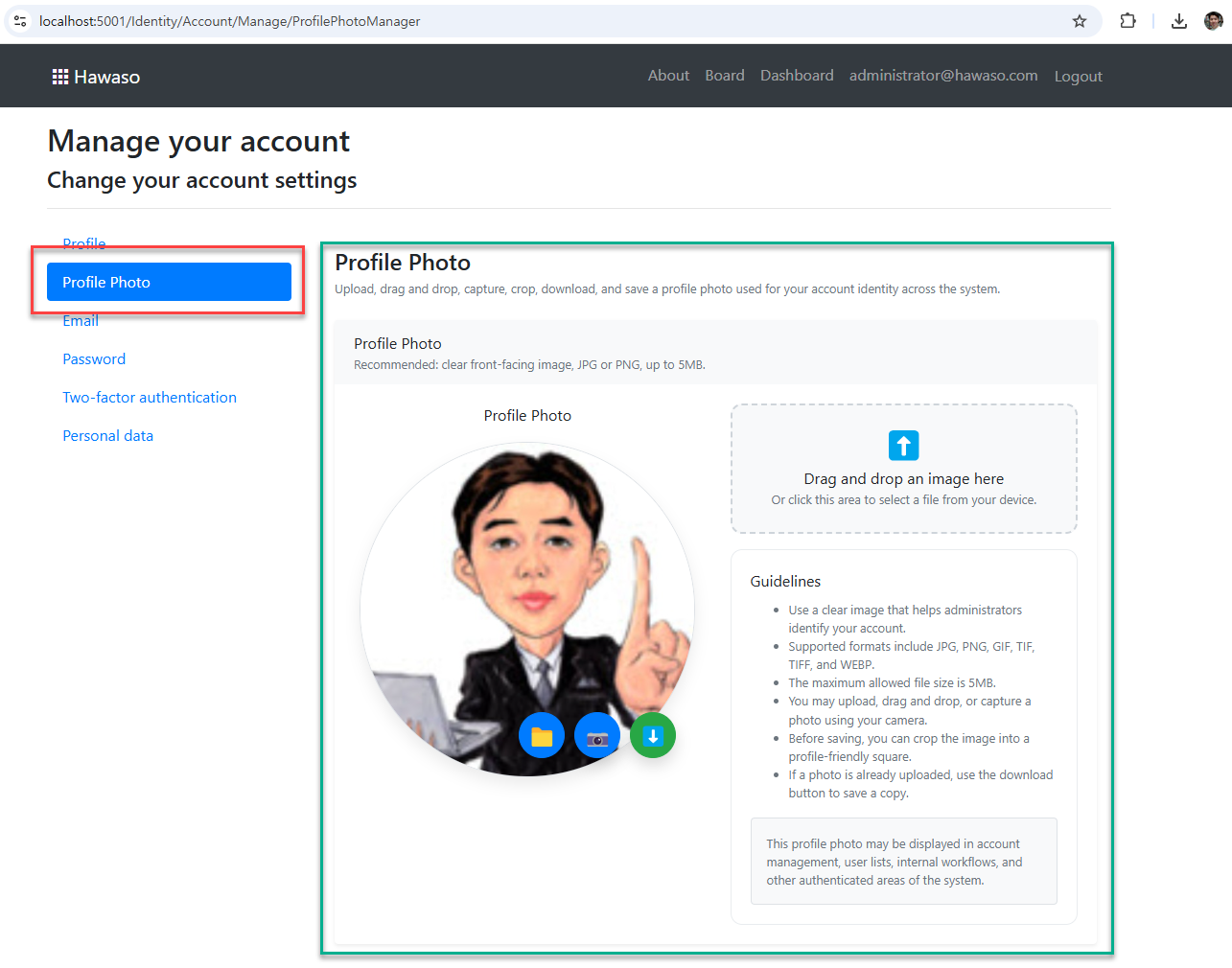
이 문서는 Profile Photo 관리 기능을 모든 .NET 프로젝트에서 재사용 가능하게 적용하는 방법을 설명합니다.
그림: 인증 사용자 프로필 사진 관리
📁 추가해야 할 파일
다음 두 개의 파일을 프로젝트에 추가합니다.
잠시 후 전체 소스를 확인할 수 있습니다.
Areas/Identity/Pages/Account/Manage/ProfilePhotoManager.cshtml
Areas/Identity/Pages/Account/Manage/ProfilePhotoManager.cshtml.cs
예시 경로:
C:\dev\Hawaso\src\Hawaso\Areas\Identity\Pages\Account\Manage\ProfilePhotoManager.cshtml
C:\dev\Hawaso\src\Hawaso\Areas\Identity\Pages\Account\Manage\ProfilePhotoManager.cshtml.cs
⚙️ 적용 개요
이 기능은 ASP.NET Core Identity의 기본 구조를 그대로 활용합니다.
- 사용자 데이터는
ApplicationUser에 저장 - 이미지 데이터는
byte[]형태로 DB에 저장 - Razor Pages 기반으로 UI 구성
UserManager/SignInManager를 통해 사용자 정보 업데이트
🧱 사전 준비
1. ApplicationUser에 속성 추가
사용자 엔티티에 프로필 사진 필드를 추가합니다.
public byte[]? ProfilePicture { get; set; }
이미 존재하는 경우 생략 가능합니다.
2. 데이터베이스 마이그레이션
필드 추가 후 마이그레이션을 적용합니다.
dotnet ef migrations add AddProfilePicture
dotnet ef database update
🧭 메뉴 연결
Identity 관리 메뉴에 페이지를 노출하려면 다음 파일을 수정합니다.
파일
Areas/Identity/Pages/Account/Manage/ManageNavPages.cs
추가
public static string ProfilePhotoManager => "ProfilePhotoManager";

public static string ProfilePhotoManagerNavClass(ViewContext viewContext)
    => PageNavClass(viewContext, ProfilePhotoManager);
파일
Areas/Identity/Pages/Account/Manage/_ManageNav.cshtml
메뉴 추가
<li class="nav-item">
    <a class="nav-link @ManageNavPages.ProfilePhotoManagerNavClass(ViewContext)"
       asp-page="./ProfilePhotoManager">
        Profile Photo
    </a>
</li>
🔄 ActivePage 설정
페이지 상단에 ActivePage 설정이 필요합니다.
ViewData["ActivePage"] = ManageNavPages.ProfilePhotoManager;
이 설정이 없으면 메뉴가 선택 상태로 표시되지 않습니다.
📦 전체 소스 코드
다음 섹션에서 전체 소스를 확인할 수 있습니다.
Code-Behind (로직)
Areas/Identity/Pages/Account/Manage/ProfilePhotoManager.cshtml.cs
#nullable enable

using Microsoft.AspNetCore.Http;
using Microsoft.AspNetCore.Identity;
using Microsoft.AspNetCore.Mvc;
using Microsoft.AspNetCore.Mvc.RazorPages;
using System;
using System.ComponentModel.DataAnnotations;
using System.IO;
using System.Threading.Tasks;

namespace Azunt.Web.Areas.Identity.Pages.Account.Manage
{
    public class ProfilePhotoManagerModel : PageModel
    {
        private const long MaxProfilePhotoSize = 5 * 1024 * 1024;

        private readonly UserManager<ApplicationUser> _userManager;
        private readonly SignInManager<ApplicationUser> _signInManager;

        public ProfilePhotoManagerModel(
            UserManager<ApplicationUser> userManager,
            SignInManager<ApplicationUser> signInManager)
        {
            _userManager = userManager;
            _signInManager = signInManager;
        }

        [TempData]
        public string? StatusMessage { get; set; }

        [BindProperty]
        public InputModel Input { get; set; } = new();

        public class InputModel
        {
            [Display(Name = "Profile Photo")]
            public byte[]? ProfilePhoto { get; set; }
        }

        private Task LoadAsync(ApplicationUser user)
        {
            Input = new InputModel
            {
                ProfilePhoto = user.ProfilePicture
            };

            return Task.CompletedTask;
        }

        public async Task<IActionResult> OnGetAsync()
        {
            var user = await _userManager.GetUserAsync(User);

            if (user == null)
            {
                return NotFound($"Unable to load user with ID '{_userManager.GetUserId(User)}'.");
            }

            await LoadAsync(user);

            return Page();
        }

        public async Task<IActionResult> OnGetDownloadProfilePhotoAsync()
        {
            var user = await _userManager.GetUserAsync(User);

            if (user == null)
            {
                return NotFound("Unable to load current user.");
            }

            if (user.ProfilePicture == null || user.ProfilePicture.Length == 0)
            {
                return NotFound("No profile photo found.");
            }

            var imageInfo = DetectImageInfo(user.ProfilePicture);
            var safeUserName = CreateSafeFileName(user.UserName ?? "user");
            var fileName = $"{safeUserName}-profile-photo{imageInfo.Extension}";

            return File(user.ProfilePicture, imageInfo.ContentType, fileName);
        }

        public async Task<IActionResult> OnPostUploadProfilePhotoAsync(IFormFile? profilePhoto)
        {
            var user = await _userManager.GetUserAsync(User);

            if (user == null)
            {
                return NotFound("Unable to load current user.");
            }

            var validationError = ValidateProfilePhoto(profilePhoto);

            if (!string.IsNullOrEmpty(validationError))
            {
                return BadRequest(validationError);
            }

            await SaveProfilePhotoAsync(user, profilePhoto!);

            var updateResult = await _userManager.UpdateAsync(user);

            if (!updateResult.Succeeded)
            {
                return BadRequest("Unable to update profile photo.");
            }

            await _signInManager.RefreshSignInAsync(user);

            return new OkResult();
        }

        private static string? ValidateProfilePhoto(IFormFile? profilePhoto)
        {
            if (profilePhoto == null || profilePhoto.Length == 0)
            {
                return "Profile photo file is required.";
            }

            if (profilePhoto.Length > MaxProfilePhotoSize)
            {
                return "Profile photo must be 5MB or smaller.";
            }

            if (!string.IsNullOrWhiteSpace(profilePhoto.ContentType) &&
                !profilePhoto.ContentType.StartsWith("image/", StringComparison.OrdinalIgnoreCase))
            {
                return "Only image files are allowed.";
            }

            return null;
        }

        private static async Task SaveProfilePhotoAsync(ApplicationUser user, IFormFile profilePhoto)
        {
            using (var dataStream = new MemoryStream())
            {
                await profilePhoto.CopyToAsync(dataStream);
                user.ProfilePicture = dataStream.ToArray();
            }
        }

        private static ImageFileInfo DetectImageInfo(byte[] bytes)
        {
            if (bytes.Length >= 12)
            {
                if (bytes[0] == 0x89 &&
                    bytes[1] == 0x50 &&
                    bytes[2] == 0x4E &&
                    bytes[3] == 0x47)
                {
                    return new ImageFileInfo("image/png", ".png");
                }

                if (bytes[0] == 0xFF &&
                    bytes[1] == 0xD8)
                {
                    return new ImageFileInfo("image/jpeg", ".jpg");
                }

                if (bytes[0] == 0x47 &&
                    bytes[1] == 0x49 &&
                    bytes[2] == 0x46)
                {
                    return new ImageFileInfo("image/gif", ".gif");
                }

                if (bytes[0] == 0x52 &&
                    bytes[1] == 0x49 &&
                    bytes[2] == 0x46 &&
                    bytes[3] == 0x46 &&
                    bytes[8] == 0x57 &&
                    bytes[9] == 0x45 &&
                    bytes[10] == 0x42 &&
                    bytes[11] == 0x50)
                {
                    return new ImageFileInfo("image/webp", ".webp");
                }

                if ((bytes[0] == 0x49 &&
                     bytes[1] == 0x49 &&
                     bytes[2] == 0x2A &&
                     bytes[3] == 0x00) ||
                    (bytes[0] == 0x4D &&
                     bytes[1] == 0x4D &&
                     bytes[2] == 0x00 &&
                     bytes[3] == 0x2A))
                {
                    return new ImageFileInfo("image/tiff", ".tif");
                }
            }

            return new ImageFileInfo("application/octet-stream", ".bin");
        }

        private static string CreateSafeFileName(string value)
        {
            if (string.IsNullOrWhiteSpace(value))
            {
                return "user";
            }

            foreach (var invalidChar in Path.GetInvalidFileNameChars())
            {
                value = value.Replace(invalidChar, '-');
            }

            return value.Replace('@', '-').Replace('.', '-').Trim('-');
        }

        private sealed class ImageFileInfo
        {
            public ImageFileInfo(string contentType, string extension)
            {
                ContentType = contentType;
                Extension = extension;
            }

            public string ContentType { get; }

            public string Extension { get; }
        }
    }
}
Razor Page (UI)
Areas/Identity/Pages/Account/Manage/ProfilePhotoManager.cshtml
@page
@model Azunt.Web.Areas.Identity.Pages.Account.Manage.ProfilePhotoManagerModel
@{
ViewData["Title"] = "Profile Photo";
ViewData["ActivePage"] = ManageNavPages.ProfilePhotoManager;
var uploadProfilePhotoUrl = Url.Page(null, "UploadProfilePhoto");
var downloadProfilePhotoUrl = Url.Page(null, "DownloadProfilePhoto");
}
<div class="container py-4">
<div class="mb-4">
<h4 class="mb-1 fw-semibold">@ViewData["Title"]</h4>
<div class="text-muted small">
Upload, drag and drop, capture, crop, download, and save a profile photo used for your account identity across the system.
</div>
</div>
<partial name="_StatusMessage" model="Model.StatusMessage" />
<form id="profile-photo-form" method="post" enctype="multipart/form-data">
@Html.AntiForgeryToken()
<div asp-validation-summary="All" class="text-danger mb-3"></div>
<div class="card shadow-sm border-0">
<div class="card-header bg-light border-0">
<div class="fw-semibold">Profile Photo</div>
<div class="text-muted small">
Recommended: clear front-facing image, JPG or PNG, up to 5MB.
</div>
</div>
<div class="card-body">
<div class="row align-items-start g-4">
<div class="col-lg-6 text-center">
<label asp-for="Input.ProfilePhoto" class="form-label fw-semibold d-block mb-3"></label>
<div class="profile-photo-wrapper mx-auto">
@if (Model.Input.ProfilePhoto != null && Model.Input.ProfilePhoto.Length > 0)
{
<img id="profilePhoto"
class="profile-photo-preview"
src="data:image/*;base64,@Convert.ToBase64String(Model.Input.ProfilePhoto)"
alt="Profile Photo" />
<div id="profilePhotoPlaceholder"
class="profile-photo-placeholder d-none">
👤
</div>
}
else
{
<img id="profilePhoto"
class="profile-photo-preview d-none"
src=""
alt="Profile Photo" />
<div id="profilePhotoPlaceholder" class="profile-photo-placeholder">
👤
</div>
}
<div class="profile-photo-actions"
onmousedown="event.preventDefault(); event.stopPropagation();"
onclick="event.stopPropagation();">
<button type="button"
id="profilePhotoUploadButton"
class="btn btn-primary rounded-circle profile-photo-action-btn"
title="Upload Photo"
aria-label="Upload Photo"
onclick="openProfilePhotoFileUpload(event)">
📁
</button>
<button type="button"
id="profilePhotoCameraButton"
class="btn btn-primary rounded-circle profile-photo-action-btn"
title="Take Photo"
aria-label="Take Photo"
onclick="openProfilePhotoWebcamCapture(event)">
📷
</button>
@if (Model.Input.ProfilePhoto != null && Model.Input.ProfilePhoto.Length > 0)
{
<button type="button"
id="profilePhotoDownloadButton"
class="btn btn-success rounded-circle profile-photo-action-btn"
title="Download Photo"
aria-label="Download Photo"
onclick="downloadProfilePhoto(event)">
⬇️
</button>
}
</div>
</div>
<input type="file"
id="profilePhotoFileInput"
name="profilePhoto"
accept=".png,.jpg,.jpeg,.gif,.tif,.tiff,.webp"
class="d-none"
onchange="uploadProfilePhotoFromFile(this)" />
<span asp-validation-for="Input.ProfilePhoto" class="text-danger d-block mt-2"></span>
<div id="profilePhotoMessage" class="text-muted mt-2 small"></div>
</div>
<div class="col-lg-6">
<div id="profilePhotoDropZone"
class="profile-photo-drop-zone mb-3"
onclick="openProfilePhotoFileUpload(event)"
ondragenter="handleProfilePhotoDragEnter(event)"
ondragover="handleProfilePhotoDragOver(event)"
ondragleave="handleProfilePhotoDragLeave(event)"
ondrop="handleProfilePhotoDrop(event)">
<div class="profile-photo-drop-icon">⬆️</div>
<div class="fw-semibold">Drag and drop an image here</div>
<div class="text-muted small">
Or click this area to select a file from your device.
</div>
</div>
<div class="enterprise-guide-box">
<div class="fw-semibold mb-2">Guidelines</div>
<ul class="small text-muted mb-3 ps-3">
<li>Use a clear image that helps administrators identify your account.</li>
<li>Supported formats include JPG, PNG, GIF, TIF, TIFF, and WEBP.</li>
<li>The maximum allowed file size is 5MB.</li>
<li>You may upload, drag and drop, or capture a photo using your camera.</li>
<li>Before saving, you can crop the image into a profile-friendly square.</li>
<li>If a photo is already uploaded, use the download button to save a copy.</li>
</ul>
<div class="small text-muted border rounded bg-light p-3">
This profile photo may be displayed in account management, user lists, internal workflows,
and other authenticated areas of the system.
</div>
</div>
</div>
</div>
</div>
</div>
</form>
</div>
<div id="profilePhotoWebcamModal" class="modal-backdrop-custom d-none">
<div class="modal-dialog-custom">
<div class="modal-content shadow">
<div class="modal-header">
<div>
<h5 class="modal-title mb-0">Take Photo</h5>
<div class="text-muted small">Capture a photo, then crop it before uploading.</div>
</div>
<button type="button"
class="btn-close"
aria-label="Close"
onclick="closeProfilePhotoWebcamCapture()">
</button>
</div>
<div class="modal-body text-center">
<video id="profilePhotoWebcamVideo"
class="profile-photo-webcam-video"
autoplay
playsinline>
</video>
<canvas id="profilePhotoWebcamCanvas"
width="480"
height="360"
class="d-none">
</canvas>
<img id="profilePhotoWebcamPreview"
class="profile-photo-webcam-preview d-none"
alt="Captured Profile Photo" />
<div id="profilePhotoWebcamMessage" class="text-muted mt-2 small"></div>
</div>
<div class="modal-footer">
<button type="button"
class="btn btn-outline-secondary"
onclick="closeProfilePhotoWebcamCapture()">
Cancel
</button>
<button type="button"
id="profilePhotoCaptureButton"
class="btn btn-primary"
onclick="captureProfilePhotoWebcamPhoto()">
Capture
</button>
<button type="button"
id="profilePhotoWebcamUploadButton"
class="btn btn-success"
onclick="uploadProfilePhotoWebcamPhoto()">
Crop & Upload
</button>
</div>
</div>
</div>
</div>
<div id="profilePhotoCropModal" class="modal-backdrop-custom d-none">
<div class="modal-dialog-custom crop-dialog-custom">
<div class="modal-content shadow">
<div class="modal-header">
<div>
<h5 class="modal-title mb-0">Crop Profile Photo</h5>
<div class="text-muted small">
Adjust the image before uploading. The saved image will be cropped as a square.
</div>
</div>
<button type="button"
class="btn-close"
aria-label="Close"
onclick="closeProfilePhotoCropModal()">
</button>
</div>
<div class="modal-body">
<div class="crop-stage mx-auto">
<canvas id="profilePhotoCropCanvas"
width="512"
height="512"
class="profile-photo-crop-canvas">
</canvas>
</div>
<div class="mt-3">
<label for="profilePhotoCropZoom" class="form-label small fw-semibold mb-1">
Zoom
</label>
<input type="range"
id="profilePhotoCropZoom"
class="form-range"
min="1"
max="3"
step="0.05"
value="1"
oninput="renderProfilePhotoCropPreview()" />
</div>
<div class="row g-3">
<div class="col-md-6">
<label for="profilePhotoCropOffsetX" class="form-label small fw-semibold mb-1">
Horizontal Position
</label>
<input type="range"
id="profilePhotoCropOffsetX"
class="form-range"
min="-100"
max="100"
step="1"
value="0"
oninput="renderProfilePhotoCropPreview()" />
</div>
<div class="col-md-6">
<label for="profilePhotoCropOffsetY" class="form-label small fw-semibold mb-1">
Vertical Position
</label>
<input type="range"
id="profilePhotoCropOffsetY"
class="form-range"
min="-100"
max="100"
step="1"
value="0"
oninput="renderProfilePhotoCropPreview()" />
</div>
</div>
<div id="profilePhotoCropMessage" class="text-muted mt-2 small"></div>
</div>
<div class="modal-footer">
<button type="button"
class="btn btn-outline-secondary"
onclick="closeProfilePhotoCropModal()">
Cancel
</button>
<button type="button"
class="btn btn-outline-primary"
onclick="resetProfilePhotoCropControls()">
Reset
</button>
<button type="button"
id="profilePhotoCropUploadButton"
class="btn btn-success"
onclick="uploadCroppedProfilePhoto()">
Upload Cropped Photo
</button>
</div>
</div>
</div>
</div>
@section Scripts {
<style>
.profile-photo-wrapper {
position: relative;
width: 350px;
height: 350px;
}
.profile-photo-preview,
.profile-photo-placeholder {
width: 350px;
height: 350px;
border-radius: 50%;
border: 1px solid #dee2e6;
object-fit: cover;
box-shadow: 0 0.5rem 1rem rgba(0, 0, 0, .08);
}
.profile-photo-placeholder {
display: flex;
align-items: center;
justify-content: center;
font-size: 72px;
background-color: #f8f9fa;
color: #6c757d;
}
.profile-photo-actions {
position: absolute;
right: 20px;
bottom: 20px;
display: flex;
gap: 10px;
z-index: 10;
}
.profile-photo-action-btn {
width: 48px;
height: 48px;
padding: 0;
font-size: 22px;
line-height: 1;
box-shadow: 0 0.5rem 1rem rgba(0, 0, 0, .15);
}
.profile-photo-action-btn:disabled {
opacity: .65;
cursor: not-allowed;
}
.profile-photo-drop-zone {
border: 2px dashed #ced4da;
border-radius: .75rem;
padding: 1.5rem;
text-align: center;
background: #f8f9fa;
cursor: pointer;
transition: border-color .15s ease-in-out, background-color .15s ease-in-out, box-shadow .15s ease-in-out;
}
.profile-photo-drop-zone:hover,
.profile-photo-drop-zone.profile-photo-drop-zone-active {
border-color: #0d6efd;
background: #eef5ff;
box-shadow: 0 0.25rem 0.75rem rgba(13, 110, 253, .12);
}
.profile-photo-drop-icon {
font-size: 32px;
line-height: 1;
margin-bottom: .5rem;
}
.enterprise-guide-box {
border: 1px solid #e9ecef;
border-radius: .75rem;
padding: 1.25rem;
background: #fff;
}
.modal-backdrop-custom {
position: fixed;
inset: 0;
z-index: 1055;
background: rgba(0, 0, 0, .55);
padding: 1rem;
overflow-y: auto;
}
.modal-dialog-custom {
max-width: 560px;
margin: 4rem auto;
}
.crop-dialog-custom {
max-width: 680px;
}
.profile-photo-webcam-video,
.profile-photo-webcam-preview {
width: 100%;
max-width: 480px;
border-radius: .5rem;
background: #000;
}
.crop-stage {
width: 320px;
height: 320px;
border-radius: .75rem;
border: 1px solid #dee2e6;
overflow: hidden;
background: #f8f9fa;
display: flex;
align-items: center;
justify-content: center;
}
.profile-photo-crop-canvas {
width: 320px;
height: 320px;
display: block;
background: #f8f9fa;
}
@@media (max-width: 576px) {
.profile-photo-wrapper {
width: 260px;
height: 260px;
}
.profile-photo-preview,
.profile-photo-placeholder {
width: 260px;
height: 260px;
}
.crop-stage,
.profile-photo-crop-canvas {
width: 260px;
height: 260px;
}
}
</style>
<script>
var uploadProfilePhotoUrl = '@uploadProfilePhotoUrl';
var downloadProfilePhotoUrl = '@downloadProfilePhotoUrl';
var maxProfilePhotoSize = 5 * 1024 * 1024;
var profilePhotoWebcamState = {
stream: null,
capturedBlob: null
};
var profilePhotoCropState = {
sourceBlob: null,
sourceFileName: "profile-photo.jpg",
image: null,
sourceObjectUrl: null
};
function getRequestVerificationToken() {
var tokenInput = document.querySelector('input[name="__RequestVerificationToken"]');
return tokenInput ? tokenInput.value : "";
}
function downloadProfilePhoto(event) {
if (event) {
event.preventDefault();
event.stopPropagation();
if (event.stopImmediatePropagation) {
event.stopImmediatePropagation();
}
}
if (downloadProfilePhotoUrl) {
window.location.href = downloadProfilePhotoUrl;
}
return false;
}
function setProfilePhotoMessage(message) {
var messageElement = document.getElementById("profilePhotoMessage");
if (messageElement) {
messageElement.innerText = message;
}
}
function setProfilePhotoWebcamMessage(message) {
var messageElement = document.getElementById("profilePhotoWebcamMessage");
if (messageElement) {
messageElement.innerText = message;
}
}
function setProfilePhotoCropMessage(message) {
var messageElement = document.getElementById("profilePhotoCropMessage");
if (messageElement) {
messageElement.innerText = message;
}
}
function setProfilePhotoButtonsDisabled(disabled) {
[
"profilePhotoUploadButton",
"profilePhotoCameraButton",
"profilePhotoDownloadButton",
"profilePhotoWebcamUploadButton",
"profilePhotoCaptureButton",
"profilePhotoCropUploadButton"
].forEach(function (id) {
var button = document.getElementById(id);
if (button) {
button.disabled = disabled;
}
});
}
function showProfilePhotoPreview(blobOrFile) {
var profilePhoto = document.getElementById("profilePhoto");
var placeholder = document.getElementById("profilePhotoPlaceholder");
if (profilePhoto) {
profilePhoto.src = window.URL.createObjectURL(blobOrFile);
profilePhoto.classList.remove("d-none");
}
if (placeholder) {
placeholder.classList.add("d-none");
}
}
function isValidProfilePhotoFile(file, messageSetter) {
if (!file) {
messageSetter("Profile photo file is required.");
return false;
}
if (file.size > maxProfilePhotoSize) {
messageSetter("Profile photo must be 5MB or smaller.");
return false;
}
if (file.type && !file.type.startsWith("image/")) {
messageSetter("Only image files are allowed.");
return false;
}
return true;
}
function openProfilePhotoFileUpload(event) {
if (event) {
event.preventDefault();
event.stopPropagation();
if (event.stopImmediatePropagation) {
event.stopImmediatePropagation();
}
}
var input = document.getElementById("profilePhotoFileInput");
if (input) {
input.value = "";
input.click();
}
return false;
}
function handleProfilePhotoDragEnter(event) {
event.preventDefault();
event.stopPropagation();
var dropZone = document.getElementById("profilePhotoDropZone");
if (dropZone) {
dropZone.classList.add("profile-photo-drop-zone-active");
}
}
function handleProfilePhotoDragOver(event) {
event.preventDefault();
event.stopPropagation();
var dropZone = document.getElementById("profilePhotoDropZone");
if (dropZone) {
dropZone.classList.add("profile-photo-drop-zone-active");
}
}
function handleProfilePhotoDragLeave(event) {
event.preventDefault();
event.stopPropagation();
var dropZone = document.getElementById("profilePhotoDropZone");
if (dropZone && !dropZone.contains(event.relatedTarget)) {
dropZone.classList.remove("profile-photo-drop-zone-active");
}
}
function handleProfilePhotoDrop(event) {
event.preventDefault();
event.stopPropagation();
var dropZone = document.getElementById("profilePhotoDropZone");
if (dropZone) {
dropZone.classList.remove("profile-photo-drop-zone-active");
}
if (!event.dataTransfer || !event.dataTransfer.files || event.dataTransfer.files.length === 0) {
setProfilePhotoMessage("Please drop an image file.");
return false;
}
var file = event.dataTransfer.files[0];
if (!isValidProfilePhotoFile(file, setProfilePhotoMessage)) {
return false;
}
openProfilePhotoCropModal(file, file.name || "profile-photo.jpg", setProfilePhotoMessage);
return false;
}
async function uploadProfilePhotoBlob(blob, fileName, messageSetter) {
if (!isValidProfilePhotoFile(blob, messageSetter)) {
return false;
}
var formData = new FormData();
formData.append("profilePhoto", blob, fileName);
messageSetter("Uploading photo...");
setProfilePhotoButtonsDisabled(true);
try {
var response = await fetch(uploadProfilePhotoUrl, {
method: "POST",
headers: {
"RequestVerificationToken": getRequestVerificationToken()
},
body: formData
});
if (!response.ok) {
var errorText = await response.text();
messageSetter(errorText || "Photo upload failed.");
return false;
}
messageSetter("Photo uploaded successfully.");
return true;
} catch (error) {
messageSetter("Photo upload failed.");
return false;
} finally {
setProfilePhotoButtonsDisabled(false);
}
}
async function uploadProfilePhotoFromFile(input) {
if (!input || !input.files || input.files.length === 0) {
return;
}
var file = input.files[0];
if (!isValidProfilePhotoFile(file, setProfilePhotoMessage)) {
return;
}
openProfilePhotoCropModal(file, file.name || "profile-photo.jpg", setProfilePhotoMessage);
}
function openProfilePhotoCropModal(blobOrFile, fileName, messageSetter) {
if (!isValidProfilePhotoFile(blobOrFile, messageSetter || setProfilePhotoMessage)) {
return;
}
clearProfilePhotoCropState();
profilePhotoCropState.sourceBlob = blobOrFile;
profilePhotoCropState.sourceFileName = fileName || "profile-photo.jpg";
profilePhotoCropState.sourceObjectUrl = URL.createObjectURL(blobOrFile);
var image = new Image();
image.onload = function () {
profilePhotoCropState.image = image;
resetProfilePhotoCropControls();
var cropModal = document.getElementById("profilePhotoCropModal");
if (cropModal) {
cropModal.classList.remove("d-none");
}
setProfilePhotoCropMessage("Adjust the crop area, then upload the cropped photo.");
renderProfilePhotoCropPreview();
};
image.onerror = function () {
setProfilePhotoMessage("Unable to load image for cropping.");
clearProfilePhotoCropState();
};
image.src = profilePhotoCropState.sourceObjectUrl;
}
function closeProfilePhotoCropModal() {
var cropModal = document.getElementById("profilePhotoCropModal");
if (cropModal) {
cropModal.classList.add("d-none");
}
setProfilePhotoCropMessage("");
clearProfilePhotoCropState();
}
function clearProfilePhotoCropState() {
if (profilePhotoCropState.sourceObjectUrl) {
URL.revokeObjectURL(profilePhotoCropState.sourceObjectUrl);
}
profilePhotoCropState.sourceBlob = null;
profilePhotoCropState.sourceFileName = "profile-photo.jpg";
profilePhotoCropState.image = null;
profilePhotoCropState.sourceObjectUrl = null;
}
function resetProfilePhotoCropControls() {
var zoom = document.getElementById("profilePhotoCropZoom");
var offsetX = document.getElementById("profilePhotoCropOffsetX");
var offsetY = document.getElementById("profilePhotoCropOffsetY");
if (zoom) {
zoom.value = "1";
}
if (offsetX) {
offsetX.value = "0";
}
if (offsetY) {
offsetY.value = "0";
}
renderProfilePhotoCropPreview();
}
function renderProfilePhotoCropPreview() {
var image = profilePhotoCropState.image;
var canvas = document.getElementById("profilePhotoCropCanvas");
if (!image || !canvas) {
return;
}
var context = canvas.getContext("2d");
var outputSize = canvas.width;
var zoomInput = document.getElementById("profilePhotoCropZoom");
var offsetXInput = document.getElementById("profilePhotoCropOffsetX");
var offsetYInput = document.getElementById("profilePhotoCropOffsetY");
var zoom = zoomInput ? parseFloat(zoomInput.value) : 1;
var offsetXPercent = offsetXInput ? parseFloat(offsetXInput.value) : 0;
var offsetYPercent = offsetYInput ? parseFloat(offsetYInput.value) : 0;
if (isNaN(zoom) || zoom < 1) {
zoom = 1;
}
var baseCropSize = Math.min(image.naturalWidth, image.naturalHeight);
var cropSize = baseCropSize / zoom;
var maxOffsetX = (image.naturalWidth - cropSize) / 2;
var maxOffsetY = (image.naturalHeight - cropSize) / 2;
var centerX = image.naturalWidth / 2 + (maxOffsetX * offsetXPercent / 100);
var centerY = image.naturalHeight / 2 + (maxOffsetY * offsetYPercent / 100);
var sourceX = centerX - cropSize / 2;
var sourceY = centerY - cropSize / 2;
sourceX = Math.max(0, Math.min(sourceX, image.naturalWidth - cropSize));
sourceY = Math.max(0, Math.min(sourceY, image.naturalHeight - cropSize));
context.clearRect(0, 0, outputSize, outputSize);
context.fillStyle = "#f8f9fa";
context.fillRect(0, 0, outputSize, outputSize);
context.drawImage(
image,
sourceX,
sourceY,
cropSize,
cropSize,
0,
0,
outputSize,
outputSize
);
}
async function createCroppedProfilePhotoBlob() {
return new Promise(function (resolve) {
var canvas = document.getElementById("profilePhotoCropCanvas");
if (!canvas) {
resolve(null);
return;
}
canvas.toBlob(function (blob) {
resolve(blob);
}, "image/jpeg", 0.92);
});
}
async function uploadCroppedProfilePhoto() {
if (!profilePhotoCropState.image) {
setProfilePhotoCropMessage("Please select an image first.");
return;
}
renderProfilePhotoCropPreview();
var croppedBlob = await createCroppedProfilePhotoBlob();
if (!croppedBlob) {
setProfilePhotoCropMessage("Unable to crop the image.");
return;
}
var uploaded = await uploadProfilePhotoBlob(
croppedBlob,
normalizeCroppedProfilePhotoFileName(profilePhotoCropState.sourceFileName),
setProfilePhotoCropMessage
);
if (uploaded) {
showProfilePhotoPreview(croppedBlob);
closeProfilePhotoCropModal();
window.location.reload();
}
}
function normalizeCroppedProfilePhotoFileName(fileName) {
if (!fileName) {
return "profile-photo-cropped.jpg";
}
var dotIndex = fileName.lastIndexOf(".");
if (dotIndex <= 0) {
return fileName + "-cropped.jpg";
}
return fileName.substring(0, dotIndex) + "-cropped.jpg";
}
async function openProfilePhotoWebcamCapture(event) {
if (event) {
event.preventDefault();
event.stopPropagation();
if (event.stopImmediatePropagation) {
event.stopImmediatePropagation();
}
}
var modal = document.getElementById("profilePhotoWebcamModal");
var video = document.getElementById("profilePhotoWebcamVideo");
var preview = document.getElementById("profilePhotoWebcamPreview");
if (!modal || !video || !preview) {
return false;
}
setProfilePhotoWebcamMessage("Starting camera...");
modal.classList.remove("d-none");
preview.classList.add("d-none");
preview.src = "";
video.classList.remove("d-none");
try {
var stream = await navigator.mediaDevices.getUserMedia({
video: true,
audio: false
});
profilePhotoWebcamState.stream = stream;
profilePhotoWebcamState.capturedBlob = null;
video.srcObject = stream;
setProfilePhotoWebcamMessage("Camera is ready.");
} catch (error) {
setProfilePhotoWebcamMessage("Unable to access the camera. Please allow camera permission and use HTTPS.");
}
return false;
}
function captureProfilePhotoWebcamPhoto() {
var video = document.getElementById("profilePhotoWebcamVideo");
var canvas = document.getElementById("profilePhotoWebcamCanvas");
var preview = document.getElementById("profilePhotoWebcamPreview");
if (!video || !canvas || !preview || !video.srcObject) {
setProfilePhotoWebcamMessage("Camera is not ready.");
return;
}
var width = video.videoWidth || 480;
var height = video.videoHeight || 360;
canvas.width = width;
canvas.height = height;
var context = canvas.getContext("2d");
context.drawImage(video, 0, 0, width, height);
canvas.toBlob(function (blob) {
if (!blob) {
setProfilePhotoWebcamMessage("Unable to capture photo.");
return;
}
profilePhotoWebcamState.capturedBlob = blob;
preview.src = URL.createObjectURL(blob);
preview.classList.remove("d-none");
video.classList.add("d-none");
setProfilePhotoWebcamMessage("Photo captured. Review it and click Crop & Upload.");
}, "image/jpeg", 0.9);
}
async function uploadProfilePhotoWebcamPhoto() {
if (!profilePhotoWebcamState.capturedBlob) {
setProfilePhotoWebcamMessage("Please capture a photo first.");
return;
}
closeProfilePhotoWebcamCapture(false);
openProfilePhotoCropModal(
profilePhotoWebcamState.capturedBlob,
"webcam-profile-photo.jpg",
setProfilePhotoCropMessage
);
}
function closeProfilePhotoWebcamCapture(clearCapturedBlob) {
if (clearCapturedBlob === undefined) {
clearCapturedBlob = true;
}
var modal = document.getElementById("profilePhotoWebcamModal");
var video = document.getElementById("profilePhotoWebcamVideo");
var preview = document.getElementById("profilePhotoWebcamPreview");
if (profilePhotoWebcamState.stream) {
profilePhotoWebcamState.stream.getTracks().forEach(function (track) {
track.stop();
});
}
profilePhotoWebcamState.stream = null;
if (clearCapturedBlob) {
profilePhotoWebcamState.capturedBlob = null;
}
if (video) {
video.srcObject = null;
}
if (preview) {
preview.src = "";
preview.classList.add("d-none");
}
if (modal) {
modal.classList.add("d-none");
}
setProfilePhotoWebcamMessage("");
}
</script>
}
🧩 주요 기능
이 페이지는 다음 기능을 제공합니다:
- 프로필 사진 업로드
- 드래그 앤 드롭 업로드
- 웹캠 촬영
- 이미지 크롭
- 서버 저장 (DB)
- 다운로드 (파일명 자동 생성 포함)
💾 저장 방식
기본 구현에서는 다음과 같은 구조를 사용합니다.
- 저장 위치: 데이터베이스
- 데이터 타입:
byte[] - MIME 타입: 서버에서 자동 감지
📥 다운로드 기능
서버 핸들러를 통해 파일을 직접 다운로드합니다.
- Content-Type 자동 설정
- 확장자 자동 감지
- 사용자 기반 파일명 생성
🔐 보안 고려사항
다음 항목을 반드시 고려해야 합니다.
- 인증된 사용자만 접근 가능
- 파일 타입 검증 (
image/*) - 파일 크기 제한 (예: 5MB)
- CSRF 토큰 사용 (
@Html.AntiForgeryToken())
♻️ 재사용성
이 구조의 가장 큰 장점은 다음과 같습니다.
- 모든 ASP.NET Core Identity 프로젝트에 그대로 복사 가능
- 별도의 서비스 계층 없이 즉시 사용 가능
- Razor Pages 기반으로 의존성 최소화
- 향후 Azure Blob, S3 등으로 확장 가능
✅ 정리
이 기능은 다음과 같은 특징을 갖습니다.
- 간단한 파일 추가만으로 적용 가능
- ASP.NET Core Identity 구조를 그대로 활용
- 확장성과 재사용성 확보
추천 자료: ASP.NET Core 인증 및 권한 부여
추천 자료: .NET Blazor에 대해 알아보시겠어요? .NET Blazor 알아보기를 확인해보세요!